A file you choose
When your browser supports writable file access and you approve it, the document stays at that location. Permission can expire; use Reconnect if asked. Keep your usual backup of the folder.
'%20stroke-width='4.5'%20stroke-linecap='round'/%3e%3cpath%20d='M15.5%2042.5C27.5%2050%2041%2048.5%2049%2040C42%2034%2031%2034.5%2020%2031.5'%20fill='none'%20stroke='url(%23mark-gradient)'%20stroke-width='4.5'%20stroke-linecap='round'/%3e%3c/svg%3e) Syncphonia
15-day free trial
Syncphonia
15-day free trial
Syncphonia Light · Free in your browser
Open a .md file or start writing in your browser. Edit visually, inspect the Markdown source, and save a portable copy. Ordinary editing happens on your device; you do not upload your document to a conversion service.
Free Light edition · No account or card · Mac, Windows, and Linux browsers
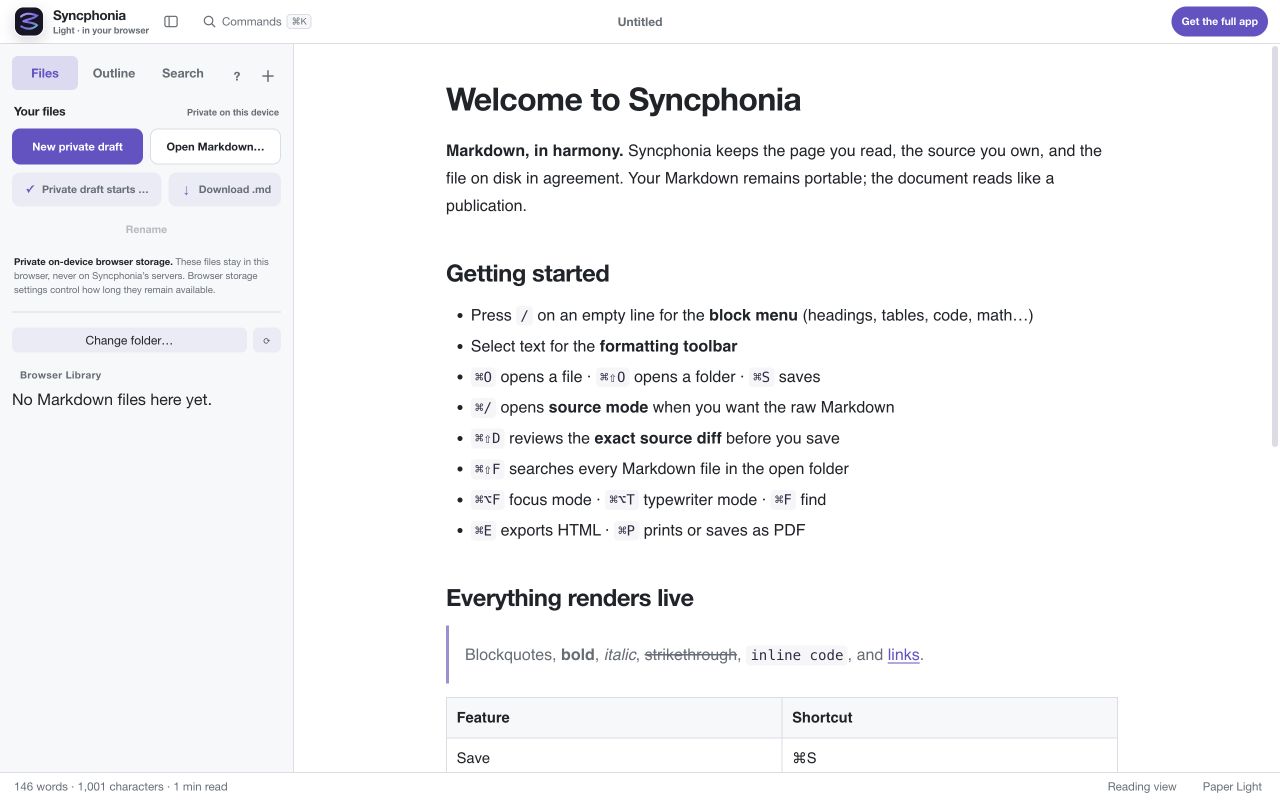
Choose Open the free Markdown editor. Select New private draft in the Files sidebar, or Open Markdown… to choose a file. If you need something to try, download our project brief example.
Click into the document to edit. Type / on an empty line for the block menu, or select text for formatting controls. Open Commands and search for source mode when you want to edit the Markdown directly.
Use Download .md for a portable Markdown copy. When the browser grants writable access to a chosen file or folder, you can save back there. Otherwise, the sidebar labels the private browser copy so you know where changes live.
Use Commands to find HTML export or Print / PDF. The Markdown-to-PDF guide walks through page settings and the final print dialog.
When your browser supports writable file access and you approve it, the document stays at that location. Permission can expire; use Reconnect if asked. Keep your usual backup of the folder.
The draft belongs to this browser profile on this device. Clearing site data can remove it. It does not sync automatically between browsers or computers, and Syncphonia cannot restore it from a server.
Download a .md copy before clearing browser data or switching devices. If persistent browser storage is unavailable, treat the document as a temporary session draft and download it before closing the tab.
Document editing is separate from public website measurement and optional network features. See the privacy notice for the exact boundaries.
Read and write ordinary Markdown, switch to source, use headings, lists, tables, code blocks, and a document outline. Download Markdown, export portable HTML, or print to PDF. The screenshot above shows the actual editor rather than a mockup.
Native file management and Word (.docx) export require the installed desktop app. Syncphonia Light is a smaller edition; it is not a trial that expires after 15 days. Compare the editions before deciding whether to install.